Alterations
Track every alteration from quote to pickup on one board, with a price list, seamstresses, fittings and due dates.
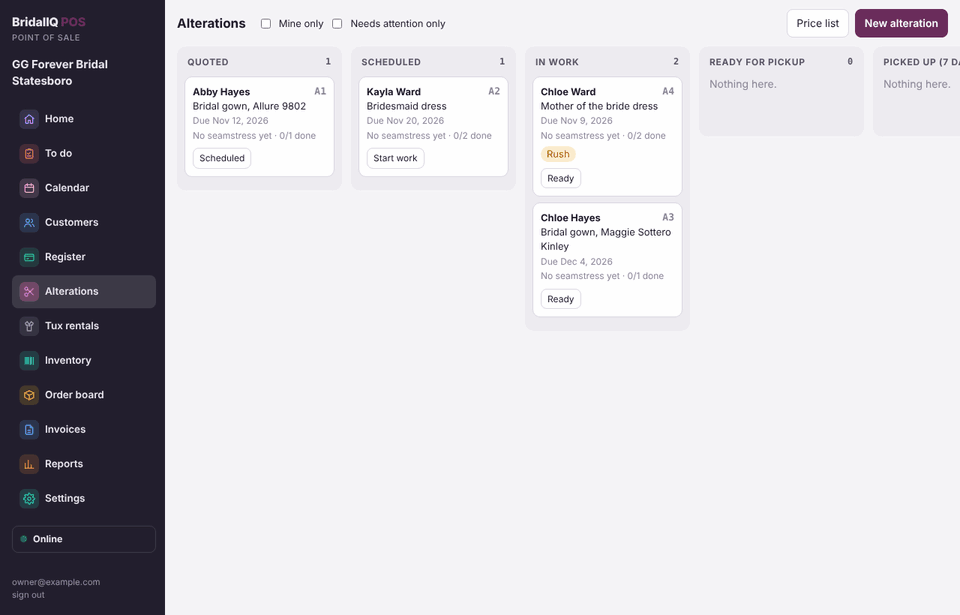
Start an alteration
- Press New alteration on the Alterations screen and pick the customer, or press Alteration on her customer page.
- Type the garment (for example "Bridal gown, Allure 9802").
- Set the due date, or leave it blank: it is set a number of days before her event (14 unless the owner changed it).
- Pick the seamstress, or type an outside seamstress and the percent she keeps.
- Tick the work from your price list, or type other work with a price. Tick Rush if needed, add notes, and press Save alteration.
Each alteration gets a bag tag number (A1, A2...) so the gown and the job match.
Move it along
Each card has a button for the next step: Scheduled, Start work, Ready, Picked up. Click a card to:
- tick off each piece of work as it is done (who and when are saved);
- add a fitting with notes (for example "pinned hem 1/2 inch");
- change the seamstress, due date, bag tag, rush or notes;
- see the history of every change.
Tick Mine only to see just your jobs, or Needs attention only for late and rush jobs.
Charge for it
- Open the alteration and press Charge at the Register. A ticket opens with the work on it.
- Take payment now or when she picks it up.
When you press Picked up, the POS warns you if it hasn't been charged or still has money due. Alterations count as sold the day she picks them up.
The price list
Press Price list to add services (name, garment, price, minutes) and hide ones you no longer do. The owner also sets the usual days before the event and whether to charge sales tax on alterations (check with your accountant).
Alterations on their own ticket
Turn on Settings, Orders and cancellations, Alterations go on their own ticket (it is off to start with). Then Charge always puts the alteration work on a new ticket of its own, linked to her gown ticket, even if you pick her gown ticket. Her layaway and gown balances are never mixed with alterations.
She can still pay both at once: on her customer page or the ticket, use Pay with her other tickets for one swipe, one pay link or one cash hand-over. The sales report shows Alterations apart from Gowns and everything else, whichever way you charge.