Your online booking page
Let brides book from your website: pick which appointments they can book, how far ahead, and whether you confirm first.
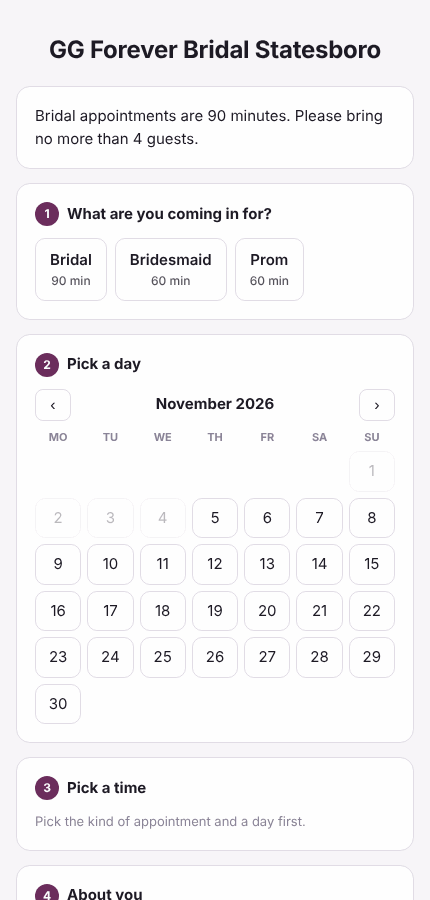
Your booking page shows brides the times when a fitting room is free and the store is open. Owners set it up.
Turn it on
- Open Settings and find Online booking.
- Tick Take bookings online.
- Choose the web address. It will be pos.bridaliq.app/book/ followed by the name you type (for example your store's name).
- Under When someone books, pick It's a request: we call to confirm, or It goes straight on the calendar.
- Set how far ahead (at least this many hours) and how far out (up to this many days) people can book.
- Write a short message for the top of the page, for example how long bridal appointments are and how many guests to bring.
- Tick the appointment types people can book, and press Save online booking.
Put it on your website
After saving, the card shows your page's address. Link a "Book an appointment" button on your website to it, or put the booking form right on a page of your site with the code from Your website (colors, Spanish, only some kinds of appointment, a short version, and steps to swap out the BridalLive code): see Your website.
What the bride fills in
She picks the kind of appointment, a day and a time, then gives her name, mobile phone, email, wedding or event date, how many guests are coming, her budget, how she heard about you, and anything you should know. She can tick to get text reminders.
Confirming requests
- Bookings made as requests show on Home under Booked online, and in the week view as online request.
- Call or text her to confirm.
- Press Confirmed next to her name.
Brides move or cancel their own appointment
Her confirmation and reminder, and her client page, carry a Move or cancel online link. It opens a page for that one appointment: she picks another open time (the same rules as booking: a room free, the store open, far enough ahead) or cancels. The change is on the calendar at once, you get a task on Home and an email, and she gets the usual confirmation. A canceled time goes back on the calendar.
- In Settings, find Brides change their own appointments (under Online booking). It is on to start with.
- Set how close to the appointment she can still change it. The default is 24 hours; closer than that, the page says Please call the store with your phone number.
- Only appointment types you opened for online booking can be moved online. Any can be canceled.
- If you wrote your own message wording, add
{change_link}where the link should go. To send the link yourself, open the appointment and press Copy her move/cancel link.