Cash drawer and end of day
Open the drawer with a count, record cash paid out, paid in and dropped to the safe, and close the day with a count and the bank deposit.
Everyone on the team can count the drawer. Owners and managers also see the day’s totals, the drawer settings and the cash drawer history. Open it all from Register, End of day.
Open the drawer (start of the day)
- On the Register, press Open the drawer (the button at the top of the ticket list says so until the drawer is open). Or open End of day and press Open the drawer on the drawer.
- Count the starting cash. Type how many of each bill and coin you have (pennies up to $100 bills) and the POS adds it up, or press Enter one total and type the total.
- The POS compares your count with what the last close left in the drawer (what was counted, less the bank deposit). If they are different, say why in the note.
- Press Open the drawer. Who opened it and when is saved.
If you take cash before the drawer is open, Take payment reminds you: Open the drawer first. Card sales are not held up.
During the day: paid out, paid in, drops
- Paid out: cash taken out to pay for something (petty cash, stamps, lunch for a trunk show). Say what it paid for. You can add a photo of the receipt.
- Paid in: cash put in that is not a sale, for example more change from the bank.
- Drop to the safe: cash taken out of the drawer and put in the safe during the day.
Each one is saved with who did it and when, and is counted in what should be in the drawer. A manager can take one back if it was a mistake (it stays in the history, marked taken back).
Close the day
- Open End of day and press Close the drawer.
- Count the drawer by bill and coin, or as one total.
- The POS shows what should be in the drawer: the opening count, plus cash taken in, less cash given back, plus paid in, less paid out and drops. It shows whether you are Even, over or short.
- Choose what stays in the drawer for tomorrow and the bank deposit (they add up to your count). Add the deposit slip number if you have one. What stays in is what tomorrow’s opening count is checked against.
- Press Close the drawer.
If the drawer is over or short by more than the store’s limit ($5 unless you change it), a manager has to OK the close and say why in the note. A manager signed in just adds the note. On a staff member’s screen, the manager picks their name and types their 4-number PIN (the same PIN as picking up before it is paid off); nobody signs out.
Card totals and the whole store’s day
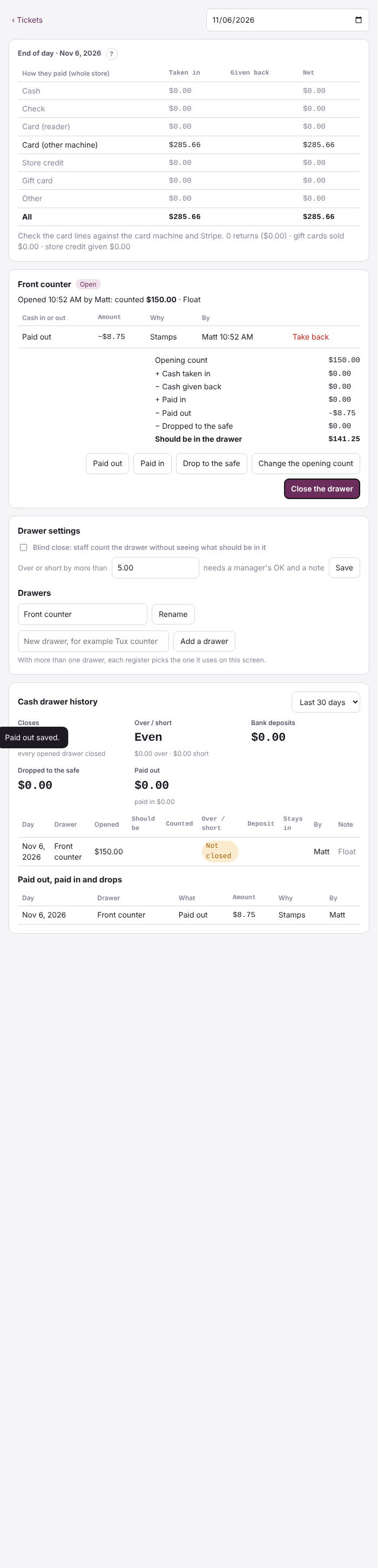
Owners and managers see the day’s money by how it was paid: cash, check, card on the reader, card on another machine, store credit and gift cards, plus returns, gift cards sold and store credit given. Check the card lines against your card machine. Card reader payments are listed by reader and matched to Stripe.
More than one drawer
A store starts with one drawer, Front counter. A manager can add more under Drawer settings (for example a tux counter). Each drawer opens and closes on its own. On each register, press Use at this register on the drawer it uses, and cash taken on that register goes into that drawer.
Cash drawer history
Owners and managers see the Cash drawer history at the bottom of the End of day screen: every open and close, over and short by day, bank deposits, drops to the safe and paid outs. Click a day to open it. To fix a day, open it and press Close it again. The morning summary on your phone and the morning-after report say whether the drawer was closed and if it was even, over or short.
When the internet is down
You can still count a drawer, and record paid out, paid in and drops. They are saved on the device and sent when the internet is back. A receipt photo, the totals and the history need the internet.
Tips at the close
When your store takes tips on card payments (Settings, Staff schedule and consultants), managers see Tips today on the End of day screen: each person's card tips and the cash tips entered. Press Pay … in card tips out of the drawer to give the card tips to the staff in cash; it's recorded on the drawer as a paid out, so the count still comes out even. Or leave them for the paycheck. Tips are never part of the sales or the sales tax, and they are in the payroll file either way. Staff counting the drawer don't see anyone's tips.